
How to Apply for WhatsApp Business API: Complete Application Guide 2026
Ready to get started with the WhatsApp Business API? This comprehensive guide walks you through the application process, required documentation, verification steps, and approval timeline. Learn how to successfully apply for WhatsApp Business API and avoid common pitfalls.
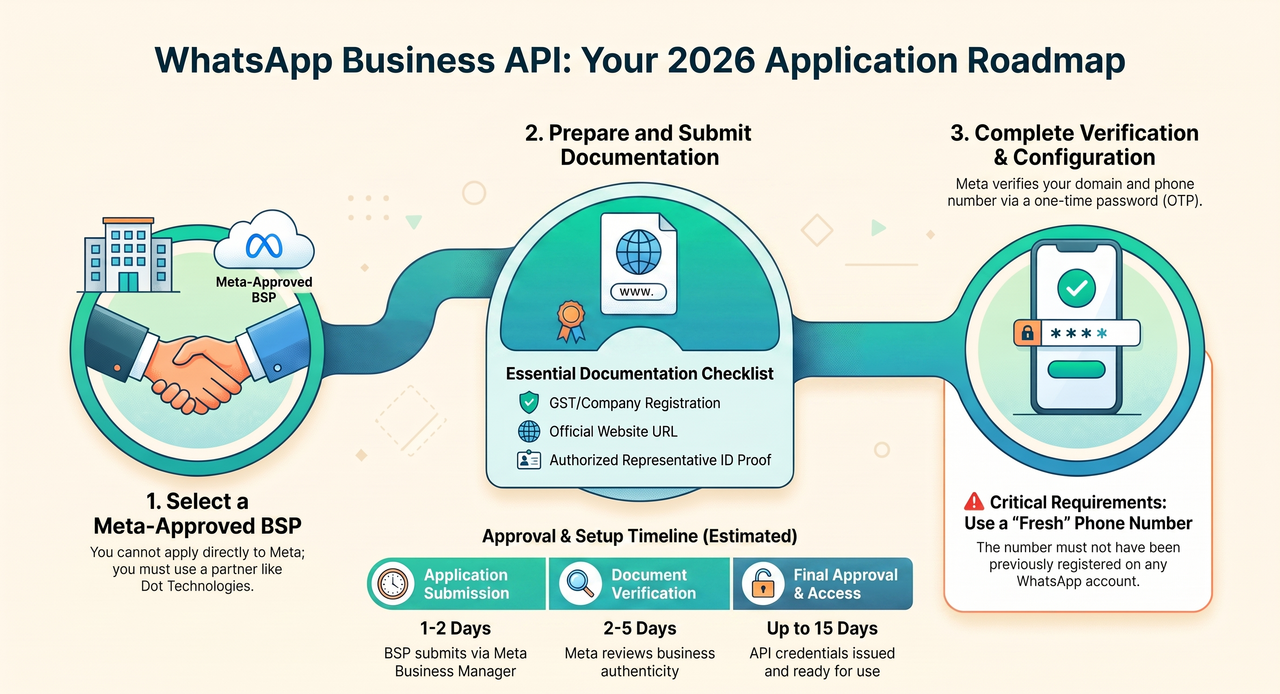
Applying for the WhatsApp Business API can seem complex, but with the right guidance, it's a straightforward process. Many businesses search for "how to get whatsapp for business api" and find themselves overwhelmed. This guide breaks down every step, from choosing a provider to getting your API credentials, ensuring a smooth application journey.
Key Insight: The WhatsApp Business API application is not a direct application to Meta. You must apply through a Meta approved WhatsApp API provider (Business Solution Provider or BSP) like Dot Technologies.
Understanding the WhatsApp Business API Application Process
The whatsapp business api application process is designed to ensure that only legitimate businesses with proper opt-in mechanisms gain access. Here's a high-level overview:
Step 1: Choose a Meta approved WhatsApp API provider (BSP) → Step 2: Prepare business documents → Step 3: Submit application via BSP → Step 4: Verify business and phone number → Step 5: Get API access and start building.
Step-by-Step Application Guide
Follow these detailed steps to successfully complete your whatsapp business api application:
Choose a Meta Approved BSP
Select an official Business Solution Provider like Dot Technologies. Your BSP will guide you through the application, provide the infrastructure, and offer ongoing support.
Why Dot Technologies? We're a meta approved whatsapp partner with free onboarding, dedicated Indian support, and transparent pricing.
Prepare Required Documents
Gather the necessary documentation for business verification. This typically includes:
- Business registration certificate (GST, Company Registration, etc.)
- Official business website with contact information
- One Business E-Mail address info@yourcompany.com
- Facebook Business Page
- Official Logo(JPG,PNG)
- One New Mobile Number
- Business profile information (name, address, phone)
Submit Application via BSP
Your BSP will submit the whatsapp api application through Meta's Business Manager. This includes providing your business details, display name, and intended use case.
Your BSP will also help you create your first message templates for approval.
Complete Business Verification
Meta will review your application and documents. This may involve:
- Verifying your business documents
- Domain verification (adding a meta tag to your website)
- Phone number verification (via OTP)
Configure Your Phone Number
Set up a dedicated phone number for the API. Important requirements:
- Number must not be registered on WhatsApp previously
- Must be able to receive SMS or voice OTP for verification
- Your BSP will handle the technical configuration
Get API Access & Start Building
Once verified, you'll receive your whatsapp marketing api credentials. Your BSP will provide:
- API keys for integration
- Dashboard access for campaign management
- Support for template creation and approval
Required Documents for Application
Having the right documents ready is crucial for a smooth whatsapp business api application. Here's a comprehensive checklist:
- Business Registration Certificate (GST, Company Registration, or Udyam)
- Official Business Website URL with contact details
- Official Business Email(Must be in Contact us Page)
- Official Business Facebook Page
- Official Business New Phone Number(Must be in Contact us Page)
- Business Profile (Name, Address, Phone, Category)
- Business Logo(JPG/PNG)
Pro Tip: Work with your BSP to ensure all documents are formatted correctly. Incomplete or incorrect documentation is the #1 reason for application delays or rejections.
Common Application Mistakes to Avoid
Based on our experience helping 500+ businesses with their whatsapp business api application, here are the most common pitfalls:
- Using a personal number: Numbers previously used on personal WhatsApp cannot be used for the API.
- Inconsistent business information: Ensure your business name, address, and website match across all documents.
- Unclear use case: Clearly explain how you'll use the API to avoid rejection.
- Missing opt-in policies: Your website must clearly state how customers can opt-in to receive messages.
- Poor message templates: Templates must be clear, valuable, and follow Meta's policies.
Application Timeline & Expectations
The whatsapp api application process typically takes 2-7 business days, but can vary based on document completeness and Meta's review queue. Here's what to expect:
| Stage | Estimated Time | What Happens |
|---|---|---|
| Application Submission | 1-2 days | BSP submits application via Meta Business Manager |
| Document Verification | 2-5 days | Meta reviews business documents and website |
| Phone Number Verification | 1 day | OTP verification for the dedicated number |
| Final Approval & API Access | 15 days | Credentials provided, ready to integrate |
Why Choose Dot Technologies for Your WhatsApp API Application?
As a Meta approved WhatsApp API partner, Dot Technologies offers:
- Free Application Support: We guide you through every step, ensuring your application is complete and accurate.
- Fast Approval: Our experience helps minimize delays and rejections.
- Local Indian Support: Get help in your timezone with personalized assistance.
- Transparent Pricing: No hidden fees for application or setup.
- End-to-End Service: From application to integration and ongoing support, we're with you every step.
Frequently Asked Questions (FAQ)
How long does the WhatsApp Business API application take?
Typically 2-7 business days, depending on document completeness and Meta's review volume. Working with a Meta approved WhatsApp API provider like Dot Technologies can speed up the process.
Can I apply for the WhatsApp Business API directly?
No. You must apply through a Business Solution Provider (BSP) like Dot Technologies. BSPs are Meta approved WhatsApp API partners that manage the technical integration and compliance.
What documents are required for the application?
You'll need business registration (GST, company registration), website URL, a Fresh Phone Number, business profile, and authorized representative's ID. Your BSP can provide a detailed checklist.
Is there an application fee for the WhatsApp Business API?
Meta itself does not charge an application fee. However, your BSP charge a application Fee or onboarding fee. Dot Technologies offers free registration for eligible businesses.
What happens if my application is rejected?
If your application is rejected, Meta will provide a reason. Your BSP can help correct any issues and resubmit the application. Common reasons include incomplete documentation or unclear use cases.
Ready to Apply for the WhatsApp Business API?
Don't let a complex application process hold back your business communication. With Dot Technologies as your meta approved whatsapp partner, you get expert guidance, free registration, and a smooth path to bulk whatsapp message service success.
Contact us today to start your whatsapp business api application and unlock the power of WhatsApp for your business.